Tuesday, 11 September 2018

The Best New Features of Windows 10

The Start Menu is Back, Baby

Windows 8 made the hugely controversial move to eliminate the Start Menu, opting instead for a don’t-call-it-Metro style Start Screen. It went over about as well as you’d expect. In Windows 10, however, the Start Menu is back. Now, Live Tiles live here just like regular app icons, in (relatively) perfect harmony.
The folder-based organization has been left behind in favor of a favorites- and search-based organization. You can start typing as soon as you open the Start menu to find an app and launch it by name. If you’d rather not type the name of an app every time, you can pin it to the Start Menu where it will live alongside your other tiles. Your most used shortcuts will also appear in their own list. You can click “All Apps” to see a list of everything that’s in your Start Menu, though it will show up as an alphabetical list that may be hard to sift through if you’re used to folders.

Cortana Makes the Start Menu Even Smarter

As if bringing the Start Menu back weren’t enough, Microsoft has built its personal voice assistant Cortana right in. Even if you’re already using Google Now or Siri, having Cortana on your desktop can be handy. You can perform web searches to get many of the same quick answers by simply pressing the Win key and typing a question like “How many ounces are in a cup” or “What’s the weather like?”
Cortana’s more than just voice commands, though. If you sign in with your Microsoft account, you can use Cortana to set reminders, add calendar events, and it can even give you Google Now-style cards with relevant information like stock quotes or news stories. Of course, many of these features only work at their best if you’re using Microsoft services—or at least syncing your services like Google Calendar to a Microsoft app—but even if you don’t want to get into Microsoft’s ecosystem, it’s still far more powerful than the Start Menu of the past.

You Can Now Add Multiple Desktops
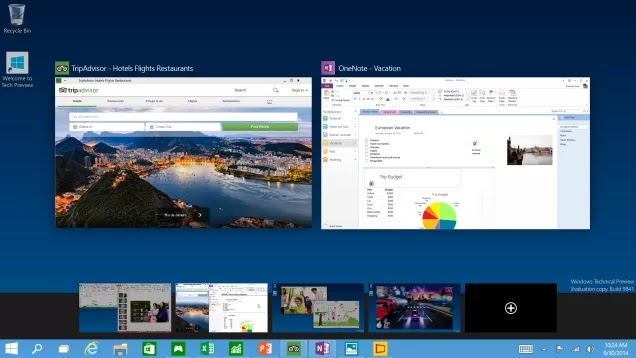
Being able to run a few apps at once is the great benefit of an operating system like Windows. Running too many, though, can get overwhelming. Now, Microsoft is finally adding the ability to create and manage multiple desktops. You can add new desktops, quickly move windows between them, and jump between desktops by pressing Win-Tab. This may not be all that useful for average users, but those of us who do a lot of work with our machines will appreciate the feature.

Sunday, 9 September 2018

Installing the SQL Anywhere ASP.NET Providers

                                 Installing the SQL Anywhere ASP.NET Providers 

The SQL Anywhere ASP.NET providers allow you to build a security mechanism using a SQL Anywhere database as backend storage. They must be installed in order to add the required schema to a designated database for storing and managing confidential user information. SQL Anywhere includes five providers: • Membership Provider: provides authentication and authorization services. • Roles Provider: provides methods for creating roles, adding users to roles, and deleting roles. Use the roles provider to assign users to groups and manage permissions. • Profiles Provider: provides methods for reading, storing, and retrieving user information such as user preferences. • Web Parts Personalization Provider: provides methods for loading and storing the personalized content and layout of web pages. • Health Monitoring Provider: provides methods for monitoring the status of deployed web applications. Please refer to the online documentation for more information about SQL Anywhere ASP.NET Providers: http://dcx.sybase.com/1101en/dbprogramming_en11/aspdotnet-providers.html. SQL Anywhere also provides a setup wizard to help you add the required security schema to the database. You can either add the SQL Anywhere ASP.NET providers to a new database or to an existing database. For simplicity, we will use the SQL Anywhere demo database (http://dcx.sybase.com/1101en/saintro_en11/sademo-s-3865920.html) in the following procedures.

Saturday, 8 September 2018

.NET


माइक्रोसॉफ्ट .NET फ्रेमवर्क (Microsoft .NET Framework) एक सॉफ्टवेयर संरचना है जो माइक्रोसॉफ्ट विन्डोज़ (Microsoft Windows) ऑपरेटिंग सिस्टम पर चल रहे कंप्यूटर पर स्थापित किये जा सकते हैं. इसमें सामान्य प्रोग्रामिंग समस्याओं के निष्पादन के लिए कोडित समाधान का एक बड़ा पुस्तकालय भी शामिल है और एक आभासी मशीनहै जो विशेष रूप से ढांचे के लिए लिखे गए प्रोग्राम के क्रियान्वयन का प्रबंधन करती है. .NET फ्रेमवर्क (.NET Framework) माइक्रोसॉफ्ट (Microsoft) की एक पेशकश है और विन्डोज़ (Windows) प्लेटफॉर्म के लिए बनाये गए अधिकांश नए अनुप्रयोगों द्वारा इस्तेमाल करने के लिए बनाया गया है.
फ्रेमवर्क की बेस कक्षा लाइब्रेरी सुविधाओं की एक बड़ी सीमा प्रदान करता है जिसमें उपयोगकर्ता इंटरफ़ेस, डेटा का उपयोग, डेटाबेस कनेक्टिविटी, क्रिप्टोग्राफी, वेब अनुप्रयोग विकास, आंकिक एल्गोरिथ्म और नेटवर्क संचार शामिल हैं. वर्ग पुस्तकालय उन प्रोग्रामर द्वारा प्रयोग किया जाता है, जो आवेदन उत्पन्न करने के लिए इसे अपने स्वयं के कोड के साथ सम्मिलित करते हैं.
.NET फ्रेमवर्क (.NET Framework) के लिए प्रोग्राम लिखने के लिए एक सॉफ्टवेयर पर्यावरण को कार्यशील किया जाता है जो प्रोग्राम चलाने के लिए आवश्यकताओं का प्रबंधन करता है. .NET फ्रेमवर्क (.NET Framework) का भी हिस्सा, इस क्रम पर्यावरण को साझा भाषा क्रम (सी एल आर (CLR)) के रूप में जाना जाता है. सी एल आर (CLR) एक आवेदन आभासी मशीन प्रदान करता है ताकि प्रोग्रामर को कार्यक्रम क्रियान्वित करने के लिए विशिष्ट सी पी यू (CPU) की क्षमताओं की जरूरत नहीं पड़े. ऐसी सुरक्षा के लिए सी एल आर (CLR) भी अन्य महत्वपूर्ण सेवाएं प्रदान करता है, जैसे -स्मृति प्रबंधन और अपवाद हैंडलिंग. श्रेणी के पुस्तकालय और सी एल आर (CLR) साथ-साथ NET Framework का गठन करते हैं.
.NET फ्रेमवर्क (.NET Framework) के संस्करण-3 में विन्डोज़ सर्वर (Windows Server)2008, विन्डोज़ विस्ता (Windows Vista), और विन्डोज़-7 (Windows-7) शामिल हैं. फ्रेमवर्क का वर्तमान स्थिर संस्करण जो 3.5 है, उसे विन्डोज़ एक्स पी (Windows XP) और विन्डोज़ सर्वर (Windows Server) 2003 ऑपरेटिंग सिस्टम के परिवार पर भी स्थापित किया जा सकता है.[2] फ्रेमवर्क के संस्करण 4 को 20 मई, 2009 को एक सार्वजनिक बीटा के रूप में जारी किया गया था.
.NET फ्रेमवर्क (.NET Framework) परिवार में मोबाइल या एम्बेडेड उपकरण के इस्तेमाल के लिए दो संस्करण भी शामिल है. फ्रेमवर्क का एक छोटा संस्करण,.NET कम्पैक्ट फ्रेमवर्क, विन्डोज़ सीई (Windows CE) प्लेटफार्म पर उपलब्ध है और इसमें स्मार्टफोन के रूप में विन्डोज़ (Windows) मोबाइल उपकरण शामिल हैं. इसके अतिरिक्त, .NET सूक्ष्म फ्रेमवर्क गंभीर रूप से सीमित संसाधन उपकरणों पर लक्षित है.

Thursday, 6 September 2018

HTML

(i) HTML क्या है ?
    Html का पूरा नाम Hypertext Markup Language है!
  इस भाषा का प्रयोग Website को बनाने के लिए किया जाता है!
(ii) Webpage क्या होता है ?
    Webpage,text और html tags का बना होता है! Html tags ही Browser को बताते है कि text को किस प्रकार दर्शाना!

·        HTML क्या होता है.

·         HTML क्या काम आता है.

·         HTML सिखने के लिए क्या जरुरी है .

·         HTML TAG क्या होते है .

·         एक सिंपल HTML डॉक्यूमेंट.

तो आएये शुरु करते है अपना पहला अध्याय
 सबसे पहले हम शुरु करते है HTML क्या होता है HTML एक कंप्यूटर की लैंग्वेज है  जिसका पूरा नाम हायपर टेक्स्ट मार्कअप लैंग्वेज (Hyper text markup language) है
HTML वेब पेज और वेबसाइट बनाने के काम आता हैt\
HTML
सिखने के लिए हमें किसी स्पेसल सॉफ्टवेर की जरुरत नहीं पड़ती है इसको हम अपने कंप्यूटर से सीधा इस्तमाल कर सकते है बस हमें चाहिए एक टेक्स्ट एडिटर और एक वेब ब्राउज़र जो हमारे कंप्यूटर मैं पहले से ही मोजूद होते है टेक्स्ट एडिटर के लिए हम Notepad  का इस्तमाल करेंगे और वेब ब्राउज़र के लिए हमारे कंप्यूटर मैं मोजूद वेब ब्राउज़र का इस्तमाल करेंगे .

What is ArrayList in C#?

What is ArrayList in C#? The ArrayList collection is similar to the Arrays data type in C#. The biggest difference is the dynamic natur...